Unleash Spooky Creativity with Halloween Bat Font
When October rolls around, the hunt for the perfect spooky assets begins. You need something that captures the vibe instantly without requiring hours of vector tracing or complex software skills. This is where the Halloween Bat Font steps in. It’s not your typical alphanumeric typeface designed for writing paragraphs of text. Instead, think of it as a specialized toolkit—a playful dingbats font packed entirely with bold bat icons, spooky extras, and scalable vector graphics. If you are working on seasonal branding, crafting party invites, or designing merchandise, this typeface is designed to be the secret weapon in your design arsenal.
More Than Just a Font: A Vector Icon Library
The core appeal of the Halloween Bat Font lies in its versatility and technical simplicity. Because these designs are mapped to standard keyboard keys, you don't need to navigate through complex glyph panels or external vector libraries. You simply type a letter, and a high-quality bat silhouette appears. This "type-and-go" workflow is a massive time saver for busy designers and crafters alike.
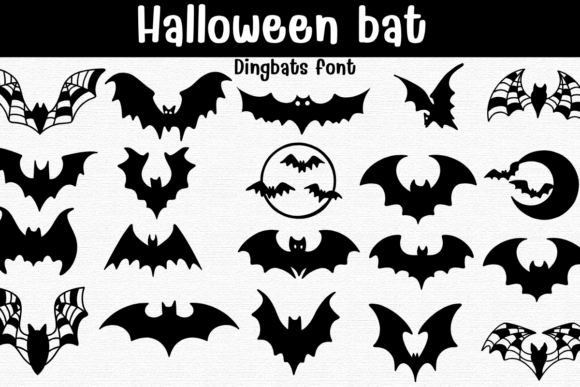
Each glyph is crafted as a clean, scalable vector. This means whether you are scaling the design up for a massive billboard or down for a tiny sticker, the lines remain crisp. There is no pixelation, no jagged edges—just smooth, production-ready artwork. The collection includes a wide variety of styles to fit different moods. You’ll find wide wingspans for dramatic impact, cute cartoon bats for a friendlier aesthetic, and intricate webbed wings for a more gothic feel. There are even crescent-moon scenes and circular badges included, allowing you to create complex compositions just by layering a few keystrokes.
Real-World Applications for Designers and Makers
The true test of a design asset is how well it performs in the real world. The Halloween Bat Font shines across a surprising number of industries and projects. Because the output is vector-based, it is ideal for any medium that requires precision cutting or high-resolution printing.
For those in the laser stencil and vinyl cutting community, this font is a game-changer. The clean outlines make it incredibly easy for software like Cricut Design Space or Silhouette Studio to trace the edges. You can create intricate wall decals, window clings, or stencils for pumpkin painting in minutes. Since the vectors are clean, the cutting machine can follow the path without getting "confused" by stray nodes or messy lines.
If you are in the print-on-demand business, particularly for T-shirts and hoodies, the bold nature of the bat icons ensures they stand out on fabric. The designs work beautifully as solid fills for dark apparel or as crisp coloring outlines for lighter garments. You can combine different bat glyphs to create unique "swarms" across a shirt design or use a single large crescent-moon scene as a central chest piece.
Party Supplies and Event Branding
Event planners and DIY enthusiasts hosting Halloween parties will find this typeface invaluable for creating a cohesive look. Imagine sending out invitations where the RSVP line is punctuated by a tiny webbed-wing bat, or creating custom treat bag labels using the circular badge icons.
Here are a few specific scenarios where the font saves the day:
- Scrapbooking: quickly adding thematic flair to digital or printed memory books without needing to glue down physical stickers.
- Poster Design: creating atmospheric backdrops for haunted houses or school dances using large, overlapping bat silhouettes.
- Decals and Stickers: designing die-cut stickers for planners, laptops, or car bumpers that scream Halloween spirit.
Seamless Workflow Across Design Platforms
One of the biggest frustrations with third-party assets is compatibility. The Halloween Bat Font alleviates this stress by coming in both OTF and TTF formats. This ensures it plays nice with virtually any operating system and design software you throw at it.
For iPad users, the integration with Procreate is seamless. You can use the native Text tool to lay out your bat designs, rasterize the layer, and then use Procreate’s brushes to add texture, shading, or a "spooky glow" effect directly onto the vectors. For desktop designers using Affinity Designer or Affinity Photo, the font behaves just like any standard typeface, allowing you to utilize the software’s powerful vector manipulation tools to warp, skew, or recolor the bats instantly.
Because it functions as a font rather than a collection of PNG files, recoloring is instantaneous. You don't need to adjust layers or use magic wand tools to change the color of a black bat to an eerie green or ghostly purple. You simply highlight the text and change the font color. This lossless workflow is essential for quick mockups where clients might request rapid color scheme changes.
Choosing the Right Asset for Your Project
While the Halloween Bat Font is incredibly useful, it is helpful to understand what it is best suited for. It is primarily a display and decorative asset. It is excellent for headers, logos, and standalone graphics, but it is not designed for writing body text (unless you want a very confusing paragraph!).
Before starting your project, consider the "weight" of the design. If you are working on a delicate piece, like a wedding invitation for a gothic-themed ceremony, you might opt for the crescent-moon or single-bat glyphs. If you are designing a flyer for a heavy metal concert or a high-energy haunted attraction, the bold, wide wingspan icons will communicate that intensity better.
Another consideration is layering. Since the glyphs are vectors, they can be stacked. You can place a bat over a text block in a design app and set the blend mode to "Multiply" or "Overlay" to integrate the bat into the background texture. This allows for professional-grade compositions that look like they took hours to create, but were actually assembled in seconds.
Maximizing Value for Seasonal Branding
For small business owners, seasonal branding can be a logistical headache. You need to update your social media headers, website banners, and email newsletters to reflect the holiday season. Using the Halloween Bat Font allows you to maintain brand consistency while injecting seasonal fun.
Because the icons are bold and recognizable, they read well even at small sizes, making them perfect for social media profile pictures or favicon-style logos. You can create a "spooky mode" version of your logo by simply swapping out a standard letter with a bat icon from this font, keeping your branding fresh without a complete overhaul.
Ultimately, this asset bridges the gap between professional vector illustration and accessible design. It empowers users who may not have advanced illustration skills to produce high-quality, scalable, and thematic artwork for any Halloween project imaginable.